
How to Set Up Your Retailer Accounts
Get each store account ready before you submit it, so checkouts go through and orders are less likely to be canceled.
ACO checks out on your own retailer accounts. A well-prepared account checks out faster and is much less likely to have orders canceled, so it's worth ten minutes per store before you submit a form.
The basics for every store
- Create the account in your own name.
- Verify your email address, and add and verify a phone number if the store asks for one.
- Save your shipping address, written the same way as the billing address on your card.
- Choose a strong password you don't use anywhere else. You'll share it with ACO, so never reuse your email or bank password.
- Sign in once from your own phone or computer, so the account has normal activity.
Tip: Brand-new accounts with no order history are the most likely to be canceled. If you can, place one small regular order on each account before a big drop.
Your card
- Use a card that works for online orders and has enough room for drop-day prices.
- Make sure the card's billing address matches what you'll type into the form.
- Many banks offer virtual cards. They're a great way to keep ACO purchases separate, and easy to switch off.
Tip: Let your bank know you'll be making online purchases during drops, so a sudden order isn't blocked as fraud.
Your email app password
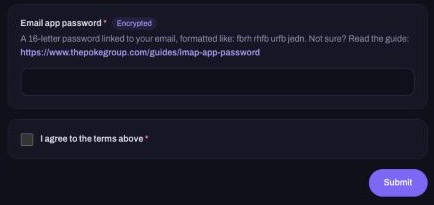
Retailers often send sign-in codes by email. ACO reads those codes with an app password: a special 16-letter password that can only read email. It isn't your normal email password, and you can delete it any time.
For Gmail:
- Open your Google Account and go to Security.
- Turn on 2-Step Verification if it isn't on already.
- Search for App passwords, create one, and copy the 16 letters.
There are step-by-step instructions in the IMAP App Password guide.
Tip: Never type your real email password into a form. If you ever want to cut off access, just delete the app password.
Store notes
- Walmart: make sure the phone number on the account is verified.
- Target: Target is stricter with automated orders and may restrict purchases. Use an account in good standing with some order history.
- Pokémon Center: drops often use a queue. Keep your address and card details up to date on the account.
- Costco and Sam's Club: if the items need a membership, make sure yours is active and linked to the account.
Checklist before you submit
- Account created in your name and signed in at least once
- Email (and phone, if asked) verified
- Shipping address saved and matching your card
- A unique password for this store
- An email app password ready to paste
All set? Head to How to Submit an ACO Form.